| A Clockwork Tomato |
12-09-2003 05:32 PM |
| quote: |
Originally posted by Tifaria
Awesome.  ACT, you have made me a Beck fan. Do Dori next!
 |
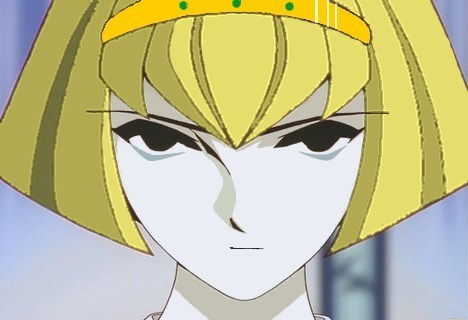
Well, here's a first pass. I'm not thrilled with it, but you get the idea.
| Lady Tesser |
12-09-2003 05:36 PM |
Cute. I recall you gave her long hair, so (of course) that needs to be worked on. And the headband being ornate.
I like.

| Tony Waynewrong |
12-09-2003 05:36 PM |
** Running off. **
Ack! It's Dori!
** Stopping. **
Hey, your cute. What do you say if we hit the town later tonight?
** Getting slapped. **
Fine, I like Dorothy better anyways.

| Lady Tesser |
12-09-2003 05:39 PM |
Better watch it, tvperez, she's Beck's woman.

"Grow some funk of your own, amigo,
grow some funk of your own
We don't like
when the gringo fight ... "
| A Clockwork Tomato |
12-09-2003 06:11 PM |
| quote: |
Originally posted by Lady Tesser
Cute. I recall you gave her long hair, so (of course) that needs to be worked on. And the headband being ornate.
I like.
|
Actually, her hair is exactly the same length as Dorothy's because I had this sort of retouching in mind when I wrote the episode, and hair is hard to do!
TVPEREZ -- your little scene would likely play out more like this:
------------
TONY: Hey, you're cute. What do you say we hit the town this evening?
DORI: I don't think my boyfriend would like that, but my friend Angel doesn't have a boyfriend. We could do a double date! You don't mind blind dates, do you? Angel's really nice -- I'm sure you'd like her.
----------
TECHNICAL NOTE: The original image for this piece was
right here on paradigm-city.com. The edits I made are obvious. In this particular case, a smile is quite literally a frown turned upside down!
--
| F-14Tomcat |
12-09-2003 06:54 PM |
That looks cool! You did a nice job preserving the different "tones" in the hair
I pray that it won't turn into a mohawk lol
| A Clockwork Tomato |
12-09-2003 06:58 PM |
| quote: |
Originally posted by Big_Venus
I have made another one, the follow up to my Mixed up one (that is lost in this forum somewhere)...it took a while to resize the Faye picture so the head could fit and would be clear at the same time. So here it is...Angel Valentine! |
Don't tell anyone, but anybody could take the image of Angel Valentine and my image of Norman in Angel's jumpsuit and make an Norman Valentine in about five minutes!
| Lady Tesser |
12-09-2003 07:03 PM |
"Gunsmith Angels" anyone??
Angel: There is such a thing as a speed limit in the domes, Dorothy.
Dorothy: Speed limits are for pansies.
| Tony Waynewrong |
12-09-2003 07:08 PM |
| quote: |
Originally posted by A Clockwork Tomato
| quote: |
Originally posted by Lady Tesser
Cute. I recall you gave her long hair, so (of course) that needs to be worked on. And the headband being ornate.
I like.
|
Actually, her hair is exactly the same length as Dorothy's because I had this sort of retouching in mind when I wrote the episode, and hair is hard to do!
TVPEREZ -- your little scene would likely play out more like this:
------------
TONY: Hey, you're cute. What do you say we hit the town this evening?
DORI: I don't think my boyfriend would like that, but my friend Angel doesn't have a boyfriend. We could do a double date! You don't mind blind dates, do you? Angel's really nice -- I'm sure you'd like her.
----------
TECHNICAL NOTE: The original image for this piece was right here on paradigm-city.com. The edits I made are obvious. In this particular case, a smile is quite literally a frown turned upside down!
-- |
LOL.
I don't know, ACT. I think it would be more like:
TONY: Hey, you're cute. What do you say we hit the town this evening?
DORI: I don't think my boyfriend would like that, but my friend Angel doesn't have a boyfriend. We could do a double date! You don't mind blind dates, do you? Angel's really nice -- I'm sure you'd like her.
TONY: I don't know. I've had some really crumby blind dates and heard some horror stories about her. Besides, doesn't Dastun have a thing for her?
DORI: I am not sure, I have never met Dastun.
TONY: It's OK, I make a great rebound anyways.
DORI: Are you sure?
TONY: Sure, I am sure. Besides, I am into brunettes and androids. I guess Angel is out of luck, again.
---------------------------------
LT, that's cool. I like it, a lot.
| R and D |
12-09-2003 07:40 PM |
OMFG!

!
*looks at inverted pic of Roger and dorothy on p.1*
*falls out of chair*
well roger u've finally learn what black means to dorothy. i think now he'll he change his rules a bit.
overall excellent!
, but disturbing!

| quote: |
| I'm still having nightmares since Alex Rosewater in boxers X.X;;;;;;;;; |
ohh and uhhh evan that was me. i shall post the pic for those who did not see it.
i used microsoft picture it by the way. if i have some time, i'll try to perfect it.

| R.Dorothy Waynewright |
12-09-2003 07:42 PM |
I hope you don't mind me doing this Zola, since it was your work that inspired me....
If you wan, you can PM or IM me and we can swap techniques.
| A Clockwork Tomato |
12-09-2003 07:47 PM |
Yipe, Lady T! You gave Dorothy the keys to the car without teaching her to drive first?
[dialog]
ANGEL: We must be getting closer to town.
DOROTHY: How can you tell?
ANGEL: We're hitting more people!
[/dialog]
Technical note: The transitions between the original image and the added stuff are still visible, and it's also apparent that the sources had different resolutions. So here's what you do: Take the "blur" tool and blur things up a bit (not a lot), and then take the "sharpen" tool and sharpen them back. Works like magic!
| Tony Waynewrong |
12-09-2003 07:51 PM |
R.Dorothy Waynewright, you made a great picture better. Bravo. This was tastefully done.
R D, that's cool. Totally believable.
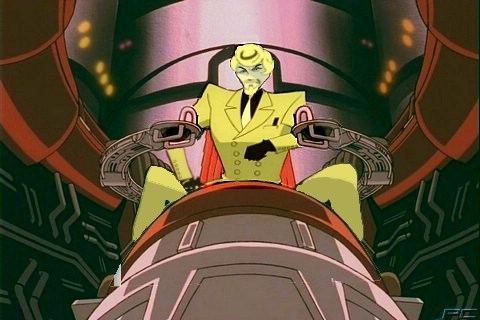
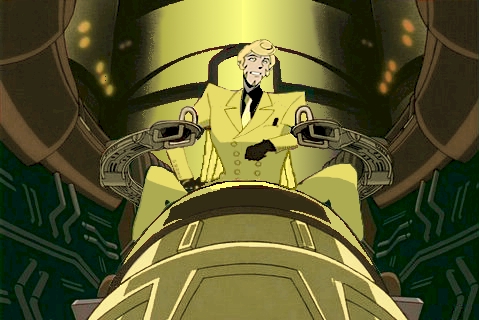
Okay. I liked the Beck in Big B pic, but the fact that the seat was still red was just... wrong. So I retouched the retouch...
First, the original:
Here's the finished product:
I promised the next time I would do some screenshots of these as I went, so here are a few of the steps involved. I know you can't really tell what I did on the small versions, just click any picture to see the large version.
#1 Beck is blurry. Cut him out
#2 Sharpen the cut-out
#3 The problem with sharpening is that it makes a mosaic of the colors
#4 The solution: Cut out the section just inside the lines
#5 Fill with the desired color--all better! Repeat on the rest of the suit.
#6 To preserve smaller lines, run the eraser over the part you want to keep prior to filling. Yes, that's a one-pixel wide eraser, but those buttons were tiny!
#7 A little more erasing is needed, but I can see where I need to erase to reveal the whole button.
#8 Now to get the pink tinge out of there! This is Beck GOLD! I cut out the section I want to dye:
#9 After dyeing:
#10 Now to show his arms behind the controls...
Yes, I found a new Beck head, but I didn't screenshot that part, I figured 10 pics was plenty
| A Clockwork Tomato |
12-09-2003 10:03 PM |
Zola, what paint program are you using? I'm using Corel PhotoPaint 7, and its sharpen tool is a blunt instrument compared to what you're using. I can't get the outlines darkened very much before I start getting horrendous halos around everything. No combination of settings seems to work. I pretty much have to settle for what I get after adjusting the contrast and adding a very small amount of sharpening.
I see you didn't have any trouble finding the three source images! All of them are from the Images section of paradigm-city.com.
I really have only mastered a handful of the tools in a modern paint program! What training I have in photo-manipulation was done around 1990, and things have gotten a lot fancier since then. My favorite tool is still the clone tool, and using blur to bury the evidence is a great gimmick. I am still using these gimmicks professionally -- for example, when a client is going to ship a product wtih a custom nameplate that hasn't been fabricated yet, so I have to fake one up from original artwork and stick it on a photograph. (Actually, that sort of thing can be easier than retouching anime scenes, because you get to start with much higher resolution.)
By the way, all of us with capture cards should keep our eyes open for panoramic scenes that involve, for example, either Roger or Dorothy in poses capable of being manipulated into something romantic. MAN, but those two need help to get into a clinch! Panoramic shots of either one of them would give us enough resolution to, for example, actually know for sure where Dorothy's mouth is! (Always a problem in ordinary medium shots.)
Oh, and if anybody knows of a nice FREE paint program for this purpose, I'm sure a lot of readers would be interested. The professional and near-professional stuff is pretty expensive.
| Falcon 7 |
12-09-2003 10:11 PM |
I hear the
Gimp is good. I say hear because I have WinXP and they were have crashing problems the last time I pesonally tried it. (sigh)
I'm sure she'll correct me later if I'm wrong, but I think Zola only worked off of the image you posted. (Other than the new head, of course.) I watched her working on it and I was stunned by everything she did with it.
| quote: |
Originally posted by A Clockwork Tomato
Zola, what paint program are you using? I'm using Corel PhotoPaint 7, and its sharpen tool is a blunt instrument compared to what you're using. I can't get the outlines darkened very much before I start getting horrendous halos around everything. No combination of settings seems to work. I pretty much have to settle for what I get after adjusting the contrast and adding a very small amount of sharpening.
I see you didn't have any trouble finding the three source images! All of them are from the Images section of paradigm-city.com.
|
I used Microsoft Image Composer, which actually was free back when I got Front Page 98. I don't even know if they are making it any more, truth be told.
You ought to check and see if there are varying settings on your sharpening tool, I really don't know anything at all about Corel.
I didn't use the source images, Falcon7 was correct. I did everything from your picture, except for the head which I got by taking a cap from Act 23 and shrinking it.
It was fun!
| Smoke |
12-10-2003 12:00 AM |
Hey, How do you get to put pictures under your messages

| IamRogerSmith |
12-10-2003 02:06 AM |
(you attach files)
Photo-manip, the first learning step in any photoshop-savy's staircase towards actual use...
| IamRogerSmith |
12-10-2003 02:26 AM |
OMGXORS ANGEL CONTROLS PARADIGM!?!?!?