Computer/Technical Help
| NVWC2006 |
09-11-2005 02:44 PM |
We finally got a DVD Recorder for the tv. Today I copied a tape to a DVD for my mom and got an idea.
Last time I checked, at the Videos section of P-C there was a clip for the Toonami ending of Big O. But it didn't seem to be of the best quality. I have had on tape for years now, Act 12, with the Toonami ending. The Toonami beginning and commercial break things are blury, tho, because I started and stopped the tapes there.
Basically, I can now put it on DVD and therefore put it on my computer to send over... But I don't have a program that could copy a clip or chapter from a DVD. Is there an application I can download to do this?
Keep in mind, if it's bigger than say 6 megabytes, I may have to wait until we get DSL to download the thing, and who knows how long that will be...
| Krang |
09-11-2005 10:54 PM |
There are actually several programs you could use for that listed
here. Personally, though, I haven't had much luck ripping directly from DVDs since they are usually interlaced, which causes problems (although in your case, this may not be a problem since you're making your own DVD). Instead, I used a video capture card connected to my TV, then played the DVD and ripped the video clips using my computer. You could also capture directly from the VHS tape to avoid losing some of the quality. But if you don't have a capture card, I would recommend trying the software above.
| quote: |
Originally posted by Krang
| quote: |
Originally posted by Volt
Recently Windows Media Player has been giving me the virtual finger. When I rip a CD using it, it doesn't fetch the CD info (track titles, etc.) from the internet automatically. And when I click "Get Album Info", it says "Please Connect to the Internet". Whaaa? I'm on a broadband connection, so I'm always connected. I switched over from dial-up to broadband recently, so this might have something to do with it, but I did change my connection speed under options to DSL (although... I'm really not sure how that would change anything. Shouldn't it just detect the connection?). And as I can expect from any Microsoft product, the Help section completely blows and doesn't help me at all with this. I'd really like to fix this, because as a result of this Audioscrobbler can't detect songs I've recently ripped (and it doesn't make uploading them to my PSP any easier, either). Any help is appreciated. |
Even if you don't use Internet Explorer as your browser, try looking at its connection options under Control Panel > Internet Options > Connections. I'm pretty sure that WMP uses the same internet settings as IE, so if IE is still configured to use your old dialup connection, WMP will try to use it as well. |
Sorry for the late reply, but I deleted my old dial up connection from the Connection list, but I don't know how to add my current broadband connection to it. I can't enter my WEP key or SSID or anything. It acts like it's just a dial-up connection.
| Dude Love |
09-18-2005 07:50 PM |
As long as you're connected to the Wireless LAN, you need to set up IE to use LAN as its connections. So, go to the same tab in Internet Options, go to LAN settings, and have it auto detect your proxy (that has always worked for me. Sort of reminds Windows that you're using a LAN to connect).
Otherwise, go to Programs>Accessories>Communications>New Connection wizard and set up a new Internet connection, set it up manually, and choose a broadband connection that is always on.
That should persuade XP to connect using your Wireless LAN. Theoretically, WMP should work now.
So would the configuration look like this? Because that doesn't seem to be working...
| Dude Love |
09-19-2005 10:53 PM |
Turn off that lower checkbox.
Holy crap it works! *kisses Wienberg's feet*
| NVWC2006 |
09-20-2005 04:33 PM |
we're getting DSL! ^^ i want to know how to set it up, tho, before we get it. we're supposed to tomorrow but i think there will be a delay of a few days b4 everything is set up.
let's just make sure i have this right, for a home dsl network:
Phone jack to DSL Modem.
the DSL modem COULD go directly to one computer, OR we can get a router. go to;
Wireless Router. Wire to one computer, use wireless capabilities with 2, possibly 3 other computers.
i believe, this on it's own should work. but i have a few questions.
file sharing... i would use the Windows file and printer sharing programs? i'm not sure what i'd do there.
printer sharing.. either use the program stated above and have it hooked to one computer, or, possibly find a way to hook it to the router? all computers will need the printer drivers.
also, when first setting up the network, i'm guessing i should come up with like some completely random name like j3hws9c6xl34f7saKa643q or something like that, because it's wireless and even with firewall and stuff, it'd be tougher to get access to a wireless network if it has some freaky name?
| Krang |
09-20-2005 11:08 PM |
| quote: |
Originally posted by NVWC2006
i believe, this on it's own should work. but i have a few questions. |
Yes, that sounds like it would work to me.
| quote: |
| file sharing... i would use the Windows file and printer sharing programs? i'm not sure what i'd do there. |
Yeah, you can use Microsoft's file and printer sharing to share your files. But even though you're behind a router, use good passwords and share only what's necessary just in case.
| quote: |
| printer sharing.. either use the program stated above and have it hooked to one computer, or, possibly find a way to hook it to the router? all computers will need the printer drivers. |
Yes, either one would work (the latter requires a separate device called a print server). And both methods require the drivers to be installed on each computer.
| quote: |
| also, when first setting up the network, i'm guessing i should come up with like some completely random name like j3hws9c6xl34f7saKa643q or something like that, because it's wireless and even with firewall and stuff, it'd be tougher to get access to a wireless network if it has some freaky name? |
Actually, the computer name and workgroup name don't really do much for security. It would help if you used something like that as your file share name, though.
| 088nd |
09-20-2005 11:29 PM |
Um. My computer won't play video files, and it gives me this message when I try to play:

Help please?
| Krang |
09-21-2005 01:30 AM |
| quote: |
Originally posted by 088nd
Um. My computer won't play video files, and it gives me this message when I try to play:
Help please? |
The first thing to try is to see if there is an update to Winamp. If not, make sure that you have the correct codecs necessary for the video file you are playing (also, make sure your codecs are up to date). If it still doesn't work, try scanning for spyware (as described in the first post in this thread) and viruses just in case. One more thing to try is to update your video drivers. If none of that works, you may have to settle for another media player until a newer version of Winamp is released (after which you should try uninstalling it completely, then installing it again). Hope this helps.
| Generalissimo D |
09-21-2005 11:44 PM |
Ok. Just want to ask this question(assuming my stuff makes it out intact):
How do you tell what kinda graphics card you can install? I hear things like PCI and AGP and whatnot. Any clarifications for me?
| Krang |
09-21-2005 11:54 PM |
| quote: |
Originally posted by D-Boy
Ok. Just want to ask this question(assuming my stuff makes it out intact):
How do you tell what kinda graphics card you can install? I hear things like PCI and AGP and whatnot. Any clarifications for me? |
The most reliable way to tell is to open your PC and look at the expansion slots. Here is an example:
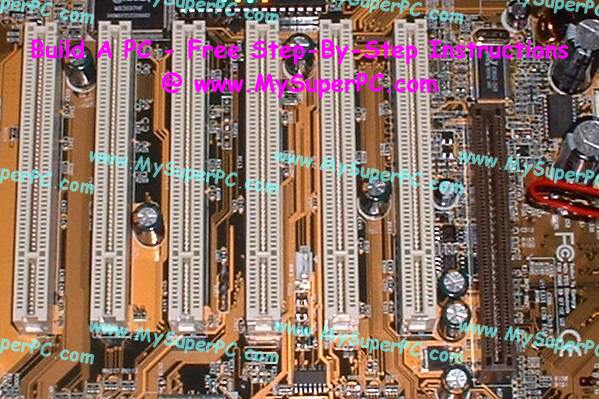
The bigger slots to the left are PCI slots, and the smaller one on the right is an AGP slot. Nearly every PC has PCI slots and most also have AGP slots. Most newer video cards use AGP, so if you have an AGP slot, it would be best to go with an AGP card.
| Generalissimo D |
09-21-2005 11:58 PM |
| quote: |
Originally posted by Krang
| quote: |
Originally posted by D-Boy
Ok. Just want to ask this question(assuming my stuff makes it out intact):
How do you tell what kinda graphics card you can install? I hear things like PCI and AGP and whatnot. Any clarifications for me? |
The most reliable way to tell is to open your PC and look at the expansion slots. Here is an example:
The bigger slots to the left are PCI slots, and the smaller one on the right is an AGP slot. Nearly every PC has PCI slots and most also have AGP slots. Most newer video cards use AGP, so if you have an AGP slot, it would be best to go with an AGP card. |
Rock on. Looks like I have some PCI slots if memory serves..
| Green_Bird |
10-02-2005 10:25 PM |
When I got the internet on my new computer, I disabled McAffee spyware/firewall, or I thought I did. The main reason I did that is because I have Norton and spysweeper to do all that stuff. But everytime I start up my computer it keeps popping up saying "Do I want to register important updates?" I keep clicking "Go back to what I was doing" but a few hours later it pops up again....how do I stop it from doing this, I alredy disabled every McAffee thing on my computer trying to stop this but it still keeps popping up...how can I get it to stop? Because it's very annoying >_< ...
| Krang |
10-03-2005 02:37 AM |
| quote: |
Originally posted by Green_Bird
When I got the internet on my new computer, I disabled McAffee spyware/firewall, or I thought I did. The main reason I did that is because I have Norton and spysweeper to do all that stuff. But everytime I start up my computer it keeps popping up saying "Do I want to register important updates?" I keep clicking "Go back to what I was doing" but a few hours later it pops up again....how do I stop it from doing this, I alredy disabled every McAffee thing on my computer trying to stop this but it still keeps popping up...how can I get it to stop? Because it's very annoying >_< ... |
If you don't want to use them at all, I would recommend uninstalling them completely using the Control Panel. If you already did this, look for any leftover McAfee/Networks Associates/NAI entries and uninstall them as well.
If you don't want to remove them completely, go to Start > Run, type msconfig, and press Enter. From there, go to the Startup tab and uncheck anything relating to those three names mentioned above.
Lately my sound card hasn't been working. I had a problem somewhat similar to this earlier this year, but the problem was that it somehow got diabled in the device manager. I checked, and it's enabled. It doesn't seem to be my speakers' problem, because I've tried my headphones as well, and no dice. It just seemed to not be working one day when I booted up my computer. Help, please?
| Krang |
10-08-2005 11:12 PM |
| quote: |
Originally posted by Volt
Lately my sound card hasn't been working. I had a problem somewhat similar to this earlier this year, but the problem was that it somehow got diabled in the device manager. I checked, and it's enabled. It doesn't seem to be my speakers' problem, because I've tried my headphones as well, and no dice. It just seemed to not be working one day when I booted up my computer. Help, please? |
It might be a hardware problem, then. If you have another computer or another sound card, you can test this by using your current sound card in the second computer to see if it works, or using the second sound card in your current computer to see if it works. If not, you could try uninstalling and reinstalling your sound card drivers and see if it helps any.
| Ace of Spades |
10-15-2005 12:39 PM |
Well whenever I try to play an audio file in Winamp its not wanting to play. I checked the file types and its all in check. Tried re-installing it and still nothing. BELP!!!
EDIT: Issue has been resolved delete or disregard.
| SmothPocket |
10-28-2005 08:17 AM |
I've Been internetless for a while so here are some topics I'm still not quite finished with
| quote: |
Originally posted by Krang
| quote: |
Originally posted by SmothPocket
Well I've been really getting into HTML lately and I was just wondering if there was a way to well... insted of putting the text you want in a table in te actual code. Is there a tag to refrence to a text file so that shows up on the website? |
There isn't a way to do that with HTML itself, but there are two common methods of doing this through server-side scripting languages:
- If your server supports PHP, change the file extension from .html to .php. Then, in the place that you want to include the text file, add this line:
| code: |
1:
|
<?php include("file.txt"); ?> |
|
where "file.txt" is the text file that you want to include.
- If your server supports SSI (server-side includes), change the file extension from .html to .shtml. Then, in the place that you want to include the text file, add this line:
| code: |
1:
|
<!--#include virtual="file.txt" --> |
|
where "file.txt" is the text file that you want to include.
Both of these methods do the exact same thing, so feel free to use whichever you prefer (and whichever your server supports). |
I'm finally on a server supporting PHP and the code isn't working for me. Is there something that I have to do before that code? To establish it as a PHP page. I know that I have to change the extension to .PHP but I was wondering if it is supposed to be written like a basic HTML page
In addition to this I was wondering if there would be a way to insert a news item or any text onto a site without having to go into the code and physically change it. Like if someone else that didn't know HTML could just type something into a box and hit the Save button and it would post it on the site
Also...
| quote: |
| If you are using Windows, you'll have to rip the DVD contents first by using DVD Decrypter (tutorial on ripping DVD content is available here). Since you want to watch the episodes on your PDA, only rip the VOB files that contain the episodes. You may need to use DGMPGDec to make a d2v file before using Avisynth. You'll need to use AviSynth to create a AVS file (via notepad) that tell the program to convert the DVD to a MPEG file. You will need QuEnc to make this work. If you search Google, there are also programs that will make this process easier. However, most of them are not free, but do offer a free trial version for you to try. |
I tried this and I keep ending up with a file that doesn't play at the end.
Thank you
