Computer/Technical Help
| Generalissimo D |
05-23-2005 10:36 PM |
I found some useless yahoo process things, but I'm still blocked in. Any other suggestions?
| Krang |
05-23-2005 11:53 PM |
| quote: |
Originally posted by D-Boy
My Ethernet card is apparently as resiliant as I am. From what I understand, its fully functioning. Yet every goddamn time I run the installation program for the SBC Yahoo DSL thing, it fails at the connection test. I need help ASAP. Also, Firefox, Steam(long since removed), and now PSO:BB do not connect at all.
PS:EZFirewall is evil. It does not want to get out of my system(Fails to uninstall, or reinstall for that matter). I think thats what may be causing it.
Edit:
Forgot to mention this.
At startup, for about the first 40-60 seconds if I am fast enough, I can get on firefox. |
Here are a few things to try. First, completely uninstall your NIC and all of its drivers. To do this, go to Start > Settings > Control Panel > System, and on the Hardware tab, click the Device Manager button. Then, find your NIC under "Network adapters," right-click it, and select Uninstall. After this, reset your computer, and the drivers will be reinstalled when Windows starts back up again.
If this doesn't help, try visiting the manufacturer's site (on a different computer, of course) and downloading the latest drivers. Then, update the drivers and see if it fixes the problem.
If not, I have a couple of questions to ask. First, did the NIC work at any point in time, or is it a new one? If it's the latter, it may be a defective card and would need to be replaced. Also, what error message do you see when you try uninstalling the firewall software?
| Generalissimo D |
05-24-2005 06:47 AM |
| quote: |
Originally posted by Krang
| quote: |
Originally posted by D-Boy
My Ethernet card is apparently as resiliant as I am. From what I understand, its fully functioning. Yet every goddamn time I run the installation program for the SBC Yahoo DSL thing, it fails at the connection test. I need help ASAP. Also, Firefox, Steam(long since removed), and now PSO:BB do not connect at all.
PS:EZFirewall is evil. It does not want to get out of my system(Fails to uninstall, or reinstall for that matter). I think thats what may be causing it.
Edit:
Forgot to mention this.
At startup, for about the first 40-60 seconds if I am fast enough, I can get on firefox. |
Here are a few things to try. First, completely uninstall your NIC and all of its drivers. To do this, go to Start > Settings > Control Panel > System, and on the Hardware tab, click the Device Manager button. Then, find your NIC under "Network adapters," right-click it, and select Uninstall. After this, reset your computer, and the drivers will be reinstalled when Windows starts back up again.
If this doesn't help, try visiting the manufacturer's site (on a different computer, of course) and downloading the latest drivers. Then, update the drivers and see if it fixes the problem.
If not, I have a couple of questions to ask. First, did the NIC work at any point in time, or is it a new one? If it's the latter, it may be a defective card and would need to be replaced. Also, what error message do you see when you try uninstalling the firewall software? |
Will do. Its not defective(at least I dont think). It worked once in the past, but due to some rearrangements I had to reinstall the software. When I try to remove EZfirewall it says "Error 2(I think):EZFirewall cannot uninstall."
| Negotiator_Roger_Smith |
05-24-2005 01:29 PM |
i am running window XP somes my computer ask do u want the computer to save a username and password when go to internet sites! normal i have the fearure on! somehow today i think i turn turned the feature off! how can i turn it back on!
| Generalissimo D |
05-24-2005 05:11 PM |
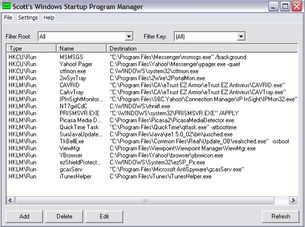
this is my startup image. I downloaded the newest drivers and reconnected. didnt work. I am not connected wireless, and it still doesnt help.
| Krang |
05-25-2005 12:25 AM |
| quote: |
Originally posted by Negotiator_Roger_Smith
i am running window XP somes my computer ask do u want the computer to save a username and password when go to internet sites! normal i have the fearure on! somehow today i think i turn turned the feature off! how can i turn it back on! |
On the Tools menu, go to Internet Options, and on the Content tab, click the AutoComplete button. Check the boxes for everything that you want it to save.
| quote: |
Originally posted by D-Boy
this is my startup image. I downloaded the newest drivers and reconnected. didnt work. I am not connected wireless, and it still doesnt help. |
Delete the entries "CaAvTray" and "CAVRID" (assuming you're not using EZ Antivirus), then reset your computer. After that, see if you can uninstall EZFirewall. Also, I can't clearly read the entry above "PRISMSVR.EXE," but it looks like it might be spyware.
| Negotiator_Roger_Smith |
05-25-2005 11:26 AM |
thank u for help!
| Zopwx2 |
05-29-2005 06:37 PM |
I seriously doubt anyone can help me, but I'm going to bitch and whine anyway.
My sound just stopped coming out of my speakers and I can't figure out why.
I didn't change a thing.
No wires are screwed up, all the voume / sound settings are right, I went through the troubleshooter twice.
I don't understand what could be the source of my problem...
EDIT: Problem Solved.
I still don't know how we did it, but I brought my dad in to help get an outside prespective and we just kept fiddling with things, with no success.
Then randomly I emptied my recycle bin and BOOM the crumpled paper noise, and after that everything was fixed.....wierd
| paul1290 |
06-02-2005 01:18 PM |
Just a tip for those of you using Ad-Aware:
After doing a smart system scan, you might want do a custom scan of the Documents and Settings folder. A lot of tracking cookies and stuff like to go there and for some reason smart system scan doesn't check the Documents and Settings folder. This only seems to happen with Windows XP so if you have another OS then you might not have to do this. (Although you might as well do it anyway just to be safe.)
| R and D |
06-05-2005 06:30 PM |
What are the differemces between a 256mb, 512mb, and a 1.0 gb memory card? and which one would be good to record long mini movies for a digital camera?

i am so clueless when it comes to these things.

| Asirt |
06-05-2005 06:35 PM |
| quote: |
Originally posted by R and D
What are the differemces between a 256mb, 512mb, and a 1.0 gb memory card? and which one would be good to record long mini movies for a digital camera?
i am so clueless when it comes to these things.
|
Basically, this determines how much data each memory card can carry. In this case, the 1 gigabyte card carries the most memory in the card, and the 256 megabyte card has the least memory. For mini movies, a 256 megabyte should be fine (I don't have a digital camera myself, so someone who has done this before will be able to answer this better than I can), but if you have the money, you can go for more memory if you want.
| Shaoblane |
06-06-2005 03:09 PM |
Whats a PDF file? Someone put two of them on my e-school computer. Not that it'll matter after the 14th...
| Dude Love |
06-06-2005 04:03 PM |
Adobe Acrobat File, Shaoblane. They're the files your browser opens Adobe Acrobat Reader to view them.
| R and D |
06-06-2005 04:19 PM |
On the sound recorder in entertainment section of the accessories menu, how do you add more time than just sixty seconds?
| Krang |
06-06-2005 10:40 PM |
| quote: |
Originally posted by R and D
On the sound recorder in entertainment section of the accessories menu, how do you add more time than just sixty seconds?
|
Unfortunately, that's the longest that Sound Recorder can record. To add any additional time, you'll need another audio editing program (personally, I use Adobe Audition/Cool Edit, but there are many others to choose from).
| NVWC2006 |
06-12-2005 08:29 PM |
I've got a problem that doesn't make any sense.
It was either yesterday (the 11th) or the day before that, when the double click button on my mouse stopped working. I have a Logitech wireless mouse, with the normal 2 mouse buttons, a scroll wheel, and a double click button by the thumb.
Normally, if for some reason the double click stops working, the scroll wheel does too, because they are both extra things that the Logitech software runs, Windows recognizes on its own only the 2 normal buttons.. So I restart my Logitech Mouse Properties and it would usually be fine. Not this case.
The 2 buttons and scroll wheel still work. I thought it might be a wireless connection problem..but telling the wireless port OR the mouse to 'Connect' doesn't change anything. Popping the batteries out of the mouse, and restarting the computer doesn't do anything. The mouse is semi transparent and whenever you click a button, you see a light in it work (it's also an optical mouse), and when I use the double click button, the light does flash quickly twice, but there is no effect on the computer. I think I may try reinstalling the software but I don't want to yet.
Also, there are other user names on this computer, and no one else has complained of this problem, at least not yet. They may not have noticed, or they just don't have the problem, I still need to ask.
Any ideas?
| Krang |
06-12-2005 09:09 PM |
| quote: |
Originally posted by NVWC2006
I've got a problem that doesn't make any sense.
It was either yesterday (the 11th) or the day before that, when the double click button on my mouse stopped working. I have a Logitech wireless mouse, with the normal 2 mouse buttons, a scroll wheel, and a double click button by the thumb.
Normally, if for some reason the double click stops working, the scroll wheel does too, because they are both extra things that the Logitech software runs, Windows recognizes on its own only the 2 normal buttons.. So I restart my Logitech Mouse Properties and it would usually be fine. Not this case.
The 2 buttons and scroll wheel still work. I thought it might be a wireless connection problem..but telling the wireless port OR the mouse to 'Connect' doesn't change anything. Popping the batteries out of the mouse, and restarting the computer doesn't do anything. The mouse is semi transparent and whenever you click a button, you see a light in it work (it's also an optical mouse), and when I use the double click button, the light does flash quickly twice, but there is no effect on the computer. I think I may try reinstalling the software but I don't want to yet.
Also, there are other user names on this computer, and no one else has complained of this problem, at least not yet. They may not have noticed, or they just don't have the problem, I still need to ask.
Any ideas? |
If other people are having the same problem, I would recommend completely uninstalling the software, then installing it again. If not, double check that your mouse configuration is the same as theirs and that all the required services are running. Additionally, you could try copying one of their configurations into your profile (it may be either a file or a registry key).
| NVWC2006 |
06-12-2005 09:12 PM |
| quote: |
| Originally posted by KrangIf other people are having the same problem, I would recommend completely uninstalling the software, then installing it again. If not, double check that your mouse configuration is the same as theirs and that all the required services are running. Additionally, you could try copying one of their configurations into your profile (it may be either a file or a registry key). |
I'll try all of it, thanks. I didn't even think to copy the registry keys from the other users

.
| SmothPocket |
06-16-2005 04:15 PM |
I'm having a problem with getting my modem to work with linux... also is there anyway I could get my lynksys wireless usb reciever to work with linux? I'm using Fedora core 3 and My modem is BCM V.92 56k modem... I hope you can help but if nobody uses linux I understand...
| Asirt |
06-16-2005 04:30 PM |
| quote: |
Originally posted by SmothPocket
I'm having a problem with getting my modem to work with linux... also is there anyway I could get my lynksys wireless usb reciever to work with linux? I'm using Fedora core 3 and My modem is BCM V.92 56k modem... I hope you can help but if nobody uses linux I understand... |
First of all, I would try and see if there are any drivers for Linux on these specific items. Here's one for the Modem (scroll down to find them):
http://www.modemsite.com/56k/bcm.asp
If that doesn't work, try using a LiveCD of a different distro (such as
Knoppix or
Ubuntu) and see if it will detect both items on that distro. If one of them does detect both items, then you may need to download the drivers so that you can use them in Fedora, or use those distros instead.
I'm still new at using Linux, so I'm sorry that I can't be of any more help to you, but I hope this helps you in some way.
